If you’ve come across the name blooket in teacher groups, school newsletters, and your child’s school bag, it is probably fair to say that you might just be a little curious what it is. Blooket, a learning tool used in classrooms across the world has become popular over the last few years. It keeps students focused; that’s why teachers love it. Students are fond of it as it does not feel pedagogical. This guide has all you need to know about how it works and if it is worth using in 2026.
What Is Blooket?
Blooket is an educational website where teachers run quiz games, and students play. Here we go! The detailed explanation is that it takes your average boring review session and turns it into something that feels like an actual game. Depending on the game mode, students answer questions, and they could be stealing gold from each other, catching fish, or defending a base. The questions are unaltered, yet the experience is fully different.
Two brothers, Tom and Ben Stewart, launched the platform in 2020. The intention is to build engaging educational van tours to improve the kids’ learning experience, as children learn better when something interesting takes place. To be fair, they were. Blooket gained popularity among teachers, who found students more engaged during lessons.
If someone asks you what is a blooket? Then the short answer is that it is a quiz game platform for classrooms that kids don’t hate using.
How Do You Use Blooket?
It depends on whether you are the teacher or the student.
If You Are a Teacher
First you make a free account on blooket.com. You can either create your own questions or find an existing set of questions. With thousands of question paper sets to offer for almost all subjects, you will see that most of the time you will find what you are teaching matches with something that they have.
When your questions are ready, choose a game mode to start a session. You provide your students with a code, they enter it and the game begins. You can either run it live during the class or send it for homework. After the game ends, the site shows you how each student did on each question. No grading on your end.
If You Are a Student
There is no need for an account. All you need to do is go to blooket.com/play, enter the code your teacher provides you, choose a nickname, and you’ll be in! You earn something in the game, if you answer the questions correctly. Answer wrong and you lose progress or rewards. It is that simple.
The Game Modes
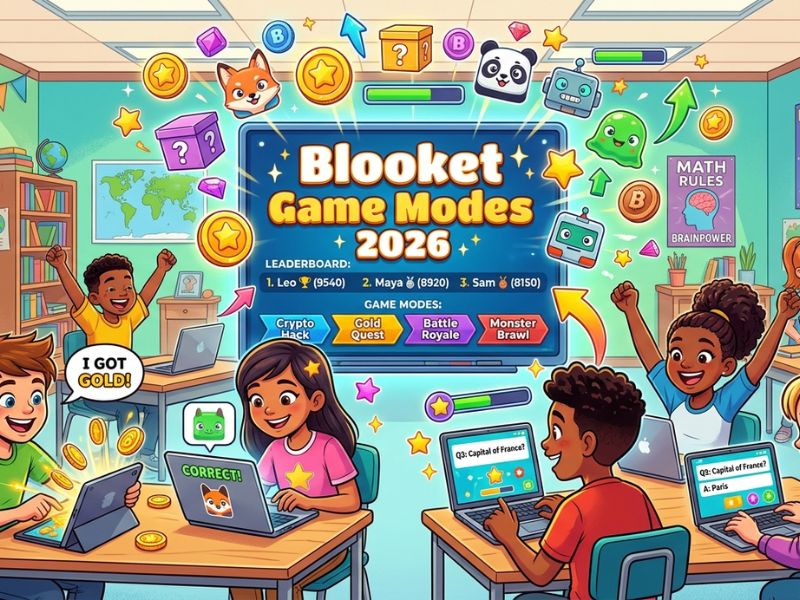
This is honestly what makes blooket worth talking about. Most quiz apps just show you a question and you pick an answer. Blooket wraps those same questions inside actual games. Here are the ones students play the most:
Gold Quest
By providing answers, you earn gold coins. However, there’s a twist: you can also rob gold off of other players. Thus, even if a player is playing well for the entirety of the game, one steal can change it all. Classes get loud during this one. It is competitive in a fun way.
Fishing Frenzy
You catch fish by answering correctly. Rarer fish give you more points. It is much calmer than Gold Quest and works well with younger kids or whenever the class just needs something chill.
Tower Defense
Hands down one of the most popular blooket game modes. You answer questions to earn towers that you place on a map to stop enemies from getting through. Kids who are into gaming absolutely love this one. They focus hard because they actually care about winning.
Cafe
You own a tiny café in which you use the coins to purchase ingredients and serve customers. Instead of merely answering questions to keep the speedy students occupied while everyone else catches up, it has a little more going on.
Battle Royale
Every round, players with wrong answers get eliminated. The last one standing wins. It gets intense fast and students pay way more attention than they do during a regular review.
Seasonal Modes
Blooket drops new blooket game modes for different times of year like Halloween or the holidays. These come and go, which gives students something to look forward to.
Why Teachers Keep Coming Back to It
A lot of edtech tools come out and disappear within a year. Blooket has been around since 2020 and schools are still using it. Here is why teachers actually stick with it:
The Data Is Right There After Every Game
When the game ends, blooket shows you exactly which questions each student got right or wrong. You do not have to grade anything or make a spreadsheet. You just look at the results and you know which topics need another day of review and which ones the class has down.
Someone Probably Already Made Your Quiz
The question library is huge. Whether you teach second grade reading or AP US History, there is almost always a set that covers what you need. You can use it as is or edit it to match your lesson. Either way it cuts your prep time down a lot.
Nobody Gets Left Out
In a normal review, fast students finish early and sit there bored while slower students feel rushed. In blooket, everyone is playing the game at their own pace the whole time. Faster students stay busy trying to win. Slower students are not embarrassed because they are still playing, just at their own speed.
You Can Assign It for Homework
Teachers can send blooket home as a solo assignment. The results automatically return to the teacher when students play it on their own. Nothing to print, nothing to remind, nothing to collect.
Free Plan vs Blooket Plus
Blooket is free to use and the free plan covers a lot. You get all the main game modes, unlimited question sets, and live hosting. For most teachers that is enough.
Blooket Plus costs money and gives you more detailed student reports, early access to new features, and extra options for customizing your sets. If you use blooket every week and want more control over the data side, it is probably worth it. If you are just starting out or use it occasionally, the free plan is fine.
What Changed in 2026
The platform has been adding things over the past couple of years. The mobile experience is much better now. It used to feel clunky on phones but that has been fixed. There is also a tool now where teachers can paste in their notes and blooket will generate a question set from them. It does not always come out perfect but it gives you a solid starting point.
They also added game modes that let teams play together, which works better in bigger classes. And they have put more work into privacy settings, which matters for schools that are careful about student data.
Is It Safe for Students?
Yes. Students do not give out any personal information to play. They just use a code and a display name. The teacher controls the session. Blooket follows the main US student privacy laws, COPPA and FERPA, so schools using it are covered on the legal side.
FAQs About Blooket
What is blooket and who is it for?
It is an online game platform built for classrooms. Teachers use it to run quiz reviews and students play along. It works for all ages but is most popular in middle and high school.
Is blooket actually free?
Yes the basic version is free and covers most of what you need. There is a paid plan called Blooket Plus if you want more features.
Do students need to make an account?
No. They just need the game code from their teacher and a display name. No email or sign-up needed.
Can I use blooket for homework?
Yes. Teachers can assign question sets as solo homework and the results are saved automatically when students finish.
How many game modes does blooket have?
Over 15 right now, and new ones get added throughout the year.
Does blooket work on a phone?
Yes. There is an app for iOS and Android and the website also works on mobile.
Conclusion
Blooket is not complicated. It is a quiz game platform that teachers run and students play. The reason it works, however, is that the students genuinely want to play it, so they will end up reviewing material without studying. If you are a teacher who hasn’t tried it yet, then just register free and run one game. It takes maybe ten minutes to set up and you will see pretty quickly why so many classrooms use it.